Accessing the Course Materials
The coursework will be found on the website "21 Things for the 21st Century Educator." Click on the "21 Things" logo to get to the website.
To access the live virtual session link and the virtual session recordings, select the "Virtual Sessions" tab above.
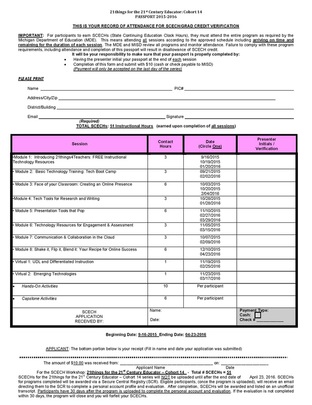
For those of you who are working toward SCECHs or Grad Credit, you will be able to download a complete list of assignments needed to complete your work in the sections below.
To access the live virtual session link and the virtual session recordings, select the "Virtual Sessions" tab above.
For those of you who are working toward SCECHs or Grad Credit, you will be able to download a complete list of assignments needed to complete your work in the sections below.
Course ScheduleThe MISD course runs in a PASSPORT SERIES and has an open entrance/exit starting on September 16, 2016 (launching at various locations) and ending April 23, 2016 .
The launch session (Module 1) is a mandatory face-to-face meeting to be held locally. Please check with your ISD or RESA for exact date and time. All portfolio materials must be submitted by April 23, 2016. A complete schedule can be downloaded and saved to your computer. You will find the schedule in the CoursePak (Time/Worklog section) to download below. Please note: these dates are subject to change. Please follow the instructions of your ISD/RESA/ RESD Agency Coordinator running the course. Virtual recordings may be available to support the content of the face-to-face courses. To view the recordings for each "Thing", visit the Virtual Recordings page. |
|
Requirements for Credit, Granting of SBCEUs/Grad Credit, and Course Completion
1. Download and complete the SCECH application form and follow the guidelines established by your service agency.
2. Download and complete and submit the work/time log (found in CoursePak) of your time spent on 21things for the SCHECH's.
3. Download, complete and submit a Digital Portfolio for each of the 21 things. This will using Pages, Posts and Categories in a blog format. The Hands-On Activities and Assignments are found on each web page. We have provided a compiled list for your convenience. This combination of your Portfolio Worksheets and Hands-On Activities and Assignments constitute a portfolio that will be used to document your successful completion. (NOTE: Check with your instructor for specific portfolio requirements).
PLEASE NOTE - THESE ARE A GUIDE ONLY - PLEASE CHECK WITH YOUR INSTRUCTOR.
* Submit Module 1 by October 30, 2015 or February 15, 2016
* Submit Module 2 by October 30, 2015 or February 15, 2016
* Submit Module 3 by October 30, 2015 or February 15, 2016
* Submit Module 4 by November 15, 2015 or March 30, 2016
* Submit Module 5 by November 15, 2015 or March 30, 2016
* Submit Module 6 by November 15, 2015 or March 30, 2016
* Submit Module 7 by December 15, 2015 or March 30, 2016
* Submit Module 8 by December 15 or April 23, 2016
* Submit Virtual 1 by December 15 or March 30, 2016
* Submit Virtual 2 by December 15 or March 30, 2016
* Submit Capstones 1 & 2 by January 10 or April 23, 2015
4. Check review with your instructor about format for your portfolio (e.g. Edublogs Campus) and where you will submit your work/links (BlackBoard 9.1).
5. Ensure that you have submitted all required documents with your SCECH application.
6. Complete the Participant Registration form.
2. Download and complete and submit the work/time log (found in CoursePak) of your time spent on 21things for the SCHECH's.
3. Download, complete and submit a Digital Portfolio for each of the 21 things. This will using Pages, Posts and Categories in a blog format. The Hands-On Activities and Assignments are found on each web page. We have provided a compiled list for your convenience. This combination of your Portfolio Worksheets and Hands-On Activities and Assignments constitute a portfolio that will be used to document your successful completion. (NOTE: Check with your instructor for specific portfolio requirements).
PLEASE NOTE - THESE ARE A GUIDE ONLY - PLEASE CHECK WITH YOUR INSTRUCTOR.
* Submit Module 1 by October 30, 2015 or February 15, 2016
* Submit Module 2 by October 30, 2015 or February 15, 2016
* Submit Module 3 by October 30, 2015 or February 15, 2016
* Submit Module 4 by November 15, 2015 or March 30, 2016
* Submit Module 5 by November 15, 2015 or March 30, 2016
* Submit Module 6 by November 15, 2015 or March 30, 2016
* Submit Module 7 by December 15, 2015 or March 30, 2016
* Submit Module 8 by December 15 or April 23, 2016
* Submit Virtual 1 by December 15 or March 30, 2016
* Submit Virtual 2 by December 15 or March 30, 2016
* Submit Capstones 1 & 2 by January 10 or April 23, 2015
4. Check review with your instructor about format for your portfolio (e.g. Edublogs Campus) and where you will submit your work/links (BlackBoard 9.1).
5. Ensure that you have submitted all required documents with your SCECH application.
6. Complete the Participant Registration form.
Portfolio Evaluations
When portfolios are received, feedback will be given by the instructor. Depending on the instructor, feedback may be given via email or within the course management system being used to conduct the course. Contact your instructor to find out more about portfolio evaluation.
Suggestions for good portfolios:
*resize images/screen shots to 3" x 3" inches or slightly larger (4" x 4") so they demonstrate the concept and do not take over the page*to learn more about screen shots, visit Take-A-Screenshot.
*make sure reflections are appropriate in length (e.g. 150-300 words). Capstones should follow rubric guidelines
*proofread your work!
*use educational examples - NOT personal ones.
*final portfolios should reflect all revisions.
*Posts should be a source of Pride - The Internet is forever! Avoid grammatical, spelling, and title/case issues.
Suggestions for good portfolios:
*resize images/screen shots to 3" x 3" inches or slightly larger (4" x 4") so they demonstrate the concept and do not take over the page*to learn more about screen shots, visit Take-A-Screenshot.
*make sure reflections are appropriate in length (e.g. 150-300 words). Capstones should follow rubric guidelines
*proofread your work!
*use educational examples - NOT personal ones.
*final portfolios should reflect all revisions.
*Posts should be a source of Pride - The Internet is forever! Avoid grammatical, spelling, and title/case issues.
Course Materials
Download the following templates.


|
| ||||||
Macomb Blackboard Course
Download this document for information on how to access the Blackboard course and use it to upload assignments (Macomb)
| BlackBoard Directions and Portfolio Submissions - 2015-16 Cohort 14 |
University Grad Credit
All students will follow the same syllabus, whether it's for professional development hours, SCECHs, or Graduate Credits. Please refer to the syllabus/coursepak.
Central Michigan UniversityCentral Michigan University - 1, 2, 3 or 4 Credit option
Please contact your instructor so that registration materials can be mailed to you. Please indicate which credit option you are pursuing. The attached syllabus will give you further information. For further information, email [email protected]. |

| ||
Contacts: Macomb ISD

|

|
|
Dr. Jennifer Parker-Moore
[email protected] |
Janice Harding
[email protected] |